Zemanta- The easy Way to Share Related Content

Day 2 6: #AtoZchallenge

Yeah, we made it. Today is the last post of the #AtoZchallenge. It has been a wonderful experience. For the letter – Z– I want to share Zemanta with you.

Zemanta is a browser extension that once installed provides recommended links and photos as related content (posts). It will load automatically as you write, allowing you to click on the specific content you wish to share. Proper credit for the articles and photos are provided by default. Below is an example of a post on Blogging Tips and the related content pulled up by Zemanta.
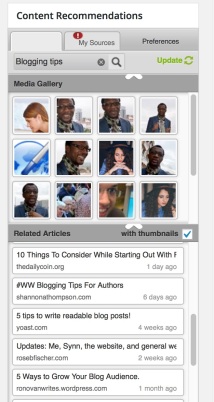
Zemanta 2

The content will show at the bottom of your post in either title  format:
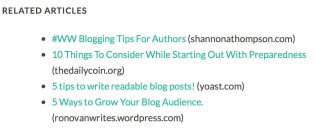
Related


or thumbnail format based on your preferences in the settings.
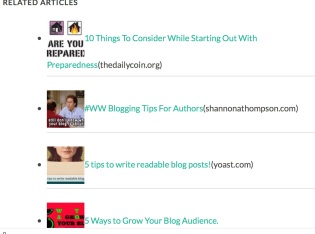
Related2


This extension saves time and gives increases your authority, promotes, links to other writer’s content and increases networking.

To download the extension, click on this link.
I hope you will try it out and let me know what you think. Again, it has been my pleasure to participate in the #AtoZChallenge and to have met each one of you. I look forward to a long and engaging relationship in the Cow Pasture.

I’d love to hear your comments. Talk to me. Tell me your story and look for me on Facebook at SheilaMGood,  PinterestBloglovinTwitter@sheilamgood, and Contently.

A2Z-BADGE 2016-smaller_zpslstazvib


Tweet this

tweetthisDay 20: #AtoZChallenge

I’m sure you’re familiar with the, “Tweet This,”embedded quotes used on other blog sites. It’s a great way to get readers engaged in the content of your blog and to share it with others.

If you self host, you can use the Tweet This plugin, but these plugins only apply to self-hosted blogs and web sites that use the WordPress.org software.

For those of us on WordPress.com, there is a way around the plugins.

You can use HTML if you’re comfortable dealing with code (more about that here). Or, you could simply go to the website Click to Tweet.

Enter the quote you want shared into the box, click on “generate new link,” and the URL used for the anchor link to your quote will appear.

We’re heading into the last few posts for the #AtoZChallenge. It’s been an exciting and challenging month (no pun intended). When I signed up to do this challenge, I wasn’t certain I could post every day, but I’m a pretty determined woman. So for those of you who who been on this journey with me and see the light at the end of the tunnel, here’s a quote to keep your feet to the fire.

“The difference between the impossible and the possible lies in a person’s determination.” -Tommy Lasorda. Via @sheilamgood. Tweet This

What do you think? Like the idea of Click to Tweet?

I’d love to hear your comments. Talk to me. Tell me your story and look for me on Facebook at SheilaMGood,  PinterestBloglovinTwitter@sheilamgood, and Contently.

A2Z-BADGE 2016-smaller_zpslstazvib

Pinterest for Writers

Day 16: #atozchallenge

If you’re like me, keeping up with all the social media sites is a daunting task, and it’s difficult to know where to spread the time and effort.

PinterestOne website worth paying a bit more attention to is Pinterest. When I began checking out this site, it was more about finding design tips, funny quotes, or recipes. I had no idea it was something I could utilize as a writer. Setting up an account is easy, and it’s free.

Here are a few pointers:

  1. Use the same name for you account and user name. The URL will look like this – https://www.pinterest.com/sheilamgood/
  2. Use the same photo you use on other sites; this helps with reader recognition.
  3. Create a short bio. Link other social networks to Pinterest.
  4. Download the Pinterest browser extension – when you see something Pin it.
  5. Add a Pinterest widget to your blog. Go to settings and click widget.
  6. Create boards:
    • Your interest
    • Tips for writers
    • Services you may offer – freelance writing, editing, reviews
    • Your products: Books, etc.

Advantages of Using Pinterest

  1. It’s another avenue for bringing recognition to your blog or writing.
  2. Provides the opportunity to promote your books.
  3. A place to showcase your area of expertise.
  4. Opens doors for paid writing gigs.

I have some reorganizing to do on my own, but what about you? Are you on Pinterest? Has it been beneficial to you as a writer? Want to know more about Pinterest? Check it out here.

I’d love to hear your comments. Talk to me. Tell me your story and look for me on Facebook at SheilaMGood, PinterestBloglovinTwitter@sheilamgood, and Contently.


The Struggle of Backstory

Back Story-2Many things go into the process of writing a novel. There are innumerable books and websites to help you bring the dream of your novel to fruition.

The dreaded backstory or info dump, is one of the elements that give many authors grief, including me.

As I began my journey, everything I read said to avoid info dumps and backstory. I wondered why. Isn’t the history of what drives your character the foundation of your story? It left me confused and, at times, discouraged.

I wrote and re-wrote chapters trying to make sure I wasn’t introducing too much or too early. Maybe that’s the newbie author in me but thanks to Lisa Cron from Writer Unboxed  I finally have a grasp on the concept of when and how to use backstory effectively.

Backstory is important, even in the first chapter. The key is to make it seamless. Lisa gives numerous examples from published novels which clarified this issue for me better than anything I’ve read or studied to date.

So, if you’re struggling with the backstory issue, check out The Shocking Truth About Info Dumps.

I’d love to hear your comments. Talk to me. Tell me your story and look for me on Facebook at SheilaMGood,  PinterestBloglovinTwitter@sheilagood, and Contently.