Revision Exercise

Photo courtesy of: blog.patrickrothfuss.com

I borrowed the following exercise from Darcy Pattison’s  Fiction Notes and her recent article, Pacing: Space out the Tense Moments. 

As Ms. Pattison found when having her students perform this exercise, openings of their WIP, often had little to do with the rest of the story. However, somewhere between the third and  eighth revision, they nailed it.

If you’re struggling with the opening and pacing of your current WIP, try this exercise.

Revision exercise… write eight different openings for your essay/story. Then, start writing the essay/story again from that starting point.

Happy revising and let me hear from you.

Editing Tools at Your Fingertips


I get the hibbie-jibbies every time I finish a work in progress, whether it’s a short story, flash fiction piece or blog post. Why? Because I’m convinced, the truth will come out and everyone will know I’m not a real writer. I mean, a real writer wouldn’t make stupid grammar mistakes, would they?

The truth is every writer makes grammar mistakes. Fortunately, successful writers can afford a proofreader and editor. Me? I rely on my fading memory and a few favorite editing tools.

Here are my top favorites:

1-  AutoCrit: Updated with fiction writers in mind, this program tops the list of  favorites editing tools. This program evaluates pacing, repetition, redundancies, dialog, and much more. It is my go-to editing program. Prices range from $5/month for  Gold membership to $12/month for professional. Check out this link for the different options available. You can, of course, give the program a free, but limited try. In my opinion, professional membership is the only way to go.

2- Grammarly: Is just what the name implies. It evaluates your writing for over 250 grammatical errors. Including punctuation, spelling, word choice (making suggestions), and detects plagiarism. This program is often used in colleges and universities for that purpose. Compatible with Word and Outlook, is is less friendly with a Mac product. Cost ranges from $29.95/month to $139.95 annually.

3- EditMinion: Simple to use, this free robotic copy editor pinpoints areas of weakness in seconds. The program highlights Adverbs, Weak Words, Said Passive Voice, Prepositions, Homonyms, and Clichés. A favorite of mine, its a fun way to tighten your prose.

4- ProWritingAid: Is a free online editing tool, similar to Grammarly‘s program. It checks for grammar, overused words, repetition, spelling, consistency, Clichés, and redundancies. It works with Word and Google Docs. I admit I haven’t used this tool as much but have heard favorable reviews. Cost for Premium program is $35/year; $55/2 years,$70/ 3 years, or $120/ Lifetime.

silverbirchpress.wordpress.com


In addition, to these editing tools, I have a quick find folder on my desktop with the following sites:

Grammar Girl: Quick and Dirty Tricks

Words Writers Should Delete/Word Sharpeners

The Chicago Manual of Style Online

Elements of Style

Guide to Grammar and Writing


Grammar Revolution Anyone?

I was surprised recently to learn grammar was no longer being taught in our school systems. As writer’s we know the importance of grammar. A great story poorly written will end up on the slush pile, unpublished every time. In 2012,  Progress in International Reading Literacy (PIRLS) released its findings. US students once again lagged behind other countries in reading. Our country spends more on each student than any other country. Yet, for some reason, the basics are not getting through.

I have my own theories as to why our children lag behind in reading, have poor grammar and communication skills; there are many reasons, but I believe one in particular plays a huge role – technology and more specifically texting. As convenient as texting makes our lives, it robs us the chance to genuinely communicate. Acronyms replace words, and 140 characters replace intimate face-to-face conversations. No wonder the next generation is lagging behind, losing the ability to communicate or understand basic language skills. For that, we have done them a disservice.

As a writer and a grand mother having heard the latest dismal education statistics of US students, I thought  I’d pass a great project on to you. It’s the least I can do. We have a responsibility to help re-educate our children and grandchildren. They are the future.  

David & Elizabeth O’Brien of Grammar Revolution are taking the issue head on with their Kickstarter Grammar Revolution Project.


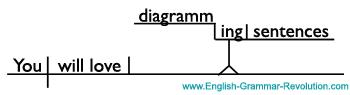
 In addition, you may want to check out their website Diagram It, where they offer Puzzlers like the one below.  It’s a great site to share with your children or grandchildren. So drop me a line and tell me. Do you agree with David  & Elizabeth? Do we need Grammar Revolution?

  This is an old slogan for Energizer batteries.

  1. It keeps going and going.
  2. It is a declarative sentence with a transitive active verb.
  3. The direct object is compound, and it is made up of two gerunds.
  4. Gerunds are verbs + -ing acting as nouns.
  5. The skeleton for your diagram looks like this.sentence diagram

Do you know the answer? Can you diagram it? When you’re finished, check your answer here. Do you want to learn more? Learn how to diagram sentences with these exercises.

Where to Find Help for Your Grammar Sins

Do you have a grammar sin? One you find repeatedly in your writing? I do. I’ll confess. When I began my writing journey more than a year ago, I discovered a horrible truth.

I was a comma whore. I placed commas the way I spoke not according to accepted grammar rules. Even with a graduate degree in hand, I had  forgotten, over the years,  how to write a well-structured sentence. How humiliating! 

Once I realized the error of my ways, courtesy of my writer’s group, I took off  to the bookstore. It was time for a refresher course.  Strunk & White’s, The Elements of Style, was my first purchase. It is the number one grammar book recommended for writers everywhere. If you don’t have copy, pick one up.

Cover of

 In addition to Strunk & White,  I also found a number of software programs available online and easy to download. Bear in mind, while not perfect, they are excellent resources.  

The programs won’t do everything for you. They won’t complete your unfinished manuscript, but they will teach you a lot about grammar and editing.

Want to tighten your writing skills? Improve your grammar? Come on, confession is good for the writing soul….

Unburden yourself. Confess your grammar sins, then check out these wonderful editing tools.

Here, you’ll find some of my favorites, acquired along the way in my effort to shed my own grammar sin. I’m a work in progress.

AutoCrit  

  1. About: Is an easy online download book editor can manage from 400-100,000 words, depending on the membership you choose. 
  2. What it Does: The program analyzes your writing sample for the following: overused words, sentence variation, cliches & redundancies, repeated words & phrases, pacing, dialog, initial pronouns, readability and homonyms. 
  3. Cost/Membership: ranges from free which is word limited to fee based ($47-117/year).

My favorite of all the programs, I chose to pay the fee and have found that the benefits, for me, outweigh the cost.

Writer’s Diet Test       Is your writing flabby or lean?

  1. About: Designed by Helen Sword, this program evaluates writing samples of   100-1000 words.
  2. What it Does: each category: verbs, nouns, adjectives/ adverbs, prepositions, and waste words (is, that, this, there) is scored  from lean to heart attack zone 
  3. Cost/Membership:  A great, free tool!
  1.  About: Is a copy editor that helps refine your writing. A copy and paste Beta program, it is word limited.
  2. What it Does: Identifies common mistakes, such as adverbs, passive voice, weak words, ‘said’ replacements, ending with prepositions and often-misplaced words. 
  3. Cost/Membership: Free for the using. 

EditMinion is another good tool for identifying those pesky adverbs.

Grammarly  

  1. About: An automated proofreader and grammar coach. Windows compatible, it can be downloaded as an office add-in to your WordPerfect and used as an additional grammar tool. Grammarly is not fully compatible for Mac users; although Mac users can utilize the program by copying and pasting.
  2. What it Does: Checks writing samples for grammar, punctuation, writing style, and even plagiarism.  
  3. Cost/Membership:  $39.95  every 3 months.

Last but not least…

  1. About: A fantastic and fun site on teaching grammar to anyone.
  2. What it Does: Offers lessons, courses, free PDF books and ongoing emails on grammar from beginning to advanced. 
  3. Cost/Membership: Some books do have a fee, others are free for download. Please refer to the site. Sign up to receive bimonthly grammar quiz emails and challenge yourself. If you have children, keep this site bookmarked!

So, Do you have a hidden grammar sin? Do you want help? Check these software programs out and let me know what you think. Did they help you? Did the quality of your writing improve? Send me a well-written sentence and let me know how you’re doing.