Looking Back at 2016

My mother once told me, the older you get, the faster time flies. She was right. The time between October 1st and the New Year gets shorter every year. It’s as if I blinked and we’re on the precipice of Valentine’s Day.

This is my first real post since taking a medical leave just after Thanksgiving. I owe big thanks to all my Cow Pasture Contributors and guest authors for helping to keep the conversations going while I was away. I hope you enjoyed their excellent posts.

I’m not at a hundred percent, but I’m getting there. In the meantime, I thought the best way to get back into the groove was to take a look back at 2016 in the Cow Pasture.

For the last couple of years, WordPress did a great job sending out an annual year-end review for WordPress bloggers. However, this year, they decided against it. So, I decided to do my own.

Mine isn’t as artistic as the one offered by WordPress, but it was definitely enlightening.

The Numbers:

In 2016, there were 167 posts published; growing the total archive of this blog to 480 posts. The most popular day for posting- Friday and the most popular time – 9:00 am.

Traffic to the Cow Pasture almost doubled with 10,086 views; 5,543 visitors. My longest streak was in the month of April when I participated in the A-Z Blogging Challenge – posting daily for 30 straight days. The busiest month of the year was July with 2062 views.

The most popular post was Dark Cloud Hovering, with the most views in one day, 341 and a whopping total 977 views. This post continues to be very popular with more than 1742 views on Stumbleupon. The post receiving the most comments: My Top Twenty Websites for Writers – 56 comments and 196 views.

How did they find Me? The top referring sites in 2016 were:

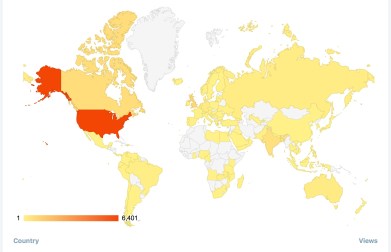
Reaching the World – One Word at a Time.

The Cow Pasture Chronicles reached more than 100 Countries and regions.
countryviews2016countriesnos2

To all my readers, Thank you, and, particularly, those who took the time to comment, interact, and share. Feedback is the lifeblood of the blogging community. I encourage each of you when you read something helpful, inspirational, or thought-provoking- speak up, say something, comment and even debate. Communication, after all, is what brings us together.

Here’s to an even bigger and better year for all of us.


I’d love to hear your thoughts on the subject. Join the conversation. Talk to me or tell me your story. I’m all ears.

Keywords- Why are They Important

Day 11:  

All Bloggers are, theoretically, familiar with the term keywords. If you’re like me, understanding what they are and what they do for our blogs is still a mystery. I’ll admit, this is one area of blogging, I haven’t gotten a complete grasp on, yet.
Keywords are words or phrases used in search engines to find the information we’re seeking. For example, place any word or phrase (best is 3-5 words) into Google, Bing, or Yahoo and a list of content reflecting your topic will appear. Keywords are either short tail (one word) or long tail (a phrase). Every article or blog content can be reduced to a few key topics. The trick is to choose your keywords carefully. Common keywords will receive thousands of clicks per day, others a few. As a blogger, you want the find and use the keywords that increase traffic to your site.

How to Find the Right Keywords:images-15

  1. Research keywords.
  2. Keep track of your keywords in a spreadsheet – include the number of clicks per day.
  3. Don’t spam – using keywords arbitrarily.
  4. Write great content that people want to read.
  5. Once you find relevant keywords, place them where they’ll give you the biggest bang.

4 Keyword Mistakes:

  1. Too many keywords – best for search engines to use one per post.
  2. Using exact phrases – Google understands related words and phrases. Don’t be so rigid.
  3. Not using keywords in photos – photo optimization is essential.
  4. You don’t research keywords

Resources for Finding Trending Keywords:

Hubspot Download your SEO template to organize keywords
Google Adwords Keyword Tool
SEMrush.com & Market samurai – find out what keywords are competitive.
Keyword Finder

Where to place the keywords:

  1. Title.
  2. Heading and subheadings.
  3. Introduction sentences.
  4.  Concluding paragraphs and meta descriptions.
  5.  Title tag.
  6. In the text, you hyperlink to other pages.
  7. When you use photos, include keywords in the file name
  8. When you reference other links.

Want more information on keywords? Check out these articles:

  1. Blogtyrant : How to Easily Find the Best Keywords to Write About (and How to Activate Them).
  2. HubspotHow to Do Keyword Research for SEO: A Beginner’s Guide by  Rachel Sprung | @
  3. Shout Me Loud: The Importance of Keywords in SEO: A Beginner’s Guide by 
  4. Moz: Is Optimizing Photos More Important Than You Think?

So, what about you? Do you have a grasp on keywords?

A2Z-BADGE 2016-smaller_zpslstazvib

I’d love to hear your comments. Talk to me. Tell me your story and look for me on Facebook at SheilaMGood,  PinterestBloglovinTwitter@sheilagood, and Contently


Guest Blogging

 Day 7: 

Have you considered guest blogging but don’t know where to begin? The first step is to determine what you want to accomplish.

What is your goal?

  1. Do you have expertise in an area and want to share it?
  2. Do you want to create more traffic to your blog or increase followers?
  3. Want to see an increase in backlinks to your content?
  4. Or, establish yourself as an authority?

Where to Find Guest Blogging Opportunities:

Once you know your motivations, it’s time to find the opportunities, and there are many.

  1. Begin with a simple keyword search for “guest post” on Google, Twitter, or preferred search engine.
  2. Utilize the connections you’ve already established – favorite blogs or other social networking sites.
  3. Look for blogs that best match your area of interest or expertise, have engaged readers, and is active on social networks.
  4. Check out sites like Contently, Huffington Post, or Angie’s Diary.

Things to do before pitching a guest post:

  1. Familiarize yourself with the blog; it’s content and readership.
  2. Have guest posts been featured before?
  3. Who were the guest bloggers? Authors? Other bloggers? Freelancers? Read their bios and get to know them.
  4. How did the guest post do? Was there a lot of reader engagement?
  5. Become a familiar face in the blogging community.

When to pitch:

  1. When someone mentions your blog on, Twitter, LinkedIn, Facebook, or Google.
  2. When a blogger advertises, they are seeking guest posts.
  3. When a guest post is featured on another blog.

How to Pitch:

  1. Read the guidelines.
  2. Introduce yourself. Craft a guest post bio and include links back to your blog or author websites that show your work.
  3. As with any pitch, personalize your email.
  4. Explain what you can offer in a guest post.
  5. Provide links to your blog and other sites on which you have published.
  6. Format your guest post the same as the site in which you are submitting.
  7. Provide valuable and relatable information.
  8. Do not self-promote except within the author bio.
  9. Utilize internal links to some of the owner’s posts.
  10. Create a call to action for comments.

Want to know more about guest blogging? Check out these resources.

 Guest Blogging Opportunities:

Does guest blogging interest you? Have you been a featured guest blogger in the past?

I’d love to hear your comments. Talk to me. Tell me your story and look for me on Facebook at SheilaMGood,  PinterestBloglovinTwitter@sheilagood, and Contently.


You Asked: SEO, What is it, and How Do I Use it ?

Welcome to another, You Asked, the Experts Answer, segment. This week ‘s question is:  SEO, what is it, and how do I use it?

For those of you who are as confused, as I am most of the time about SEO, I’ll try to make this easy to understand. First off, if you have a WordPress blog, they take care of all the technical stuff related to SEO.

What is SEO?  The acronym stands for Search Engine Optimisation.

“… the name given to activity that attempts to improve search engine rankings.”  In search results Google™ displays links to pages it considers relevant and authoritative. Authority is mostly measured by analyzing the number and quality of links from other web pages. In simple terms, your web pages have the potential to rank in Google™ so long as other web pages link to them.” Redevolution.com 

Why is  SEO so important?   Simply put, SEO is a way for your website/blog to be found in search engines  from relevant keywords or phrases.

What are Keywords? Keywords are words or phrases that your target audience might use when searching for your site. Example: if I want to find information on iCloud. I might type into Google, “Tips on using iCloud.”

SEO and keywords are nothing more than how we find things, information, or websites on the internet.  Knowing that, we certainly want our website or blog discoverable.

And the more often your page is found or linked to by someone else, the higher your website is ranked by Google. The higher the rank, the more Page Authority Google gives your site.

What is Page Authority?

“Higher page authority means greater chances of your page showing up on search engines, and that your page will be placed closer to the top of the search results. Note that page authority is related to the pages within sites, not the site itself.” Drumbeatmarketing.net

Images can give your blog/website a big boost in rankings as well,  but you have to label them correctly. Google doesn’t know an image is about the Eiffel Tower unless you provide a clue. ie. the image name, the URL of the image, or using a keyword to tag  the image.

WordPress handles the technical aspect, but it’s up to you to choose the right keywords and phrases. The good thing about that is you can search for trending keywords or even tags  right in your WordPress Reader.

Like everything else, there is a knack to using keywords:

  • Use some broad words: ie. Dogs
  • Then get specific: Bichon Frise’
  • Don’t overdo it.
  • Don’t use the same word, repeatedly.

Want more Information? Check out the following articles and always remember WordPress support is always available.

  1. SEO and Your Blog
  2. WordPress Support
  3. You Can Optimize Your WordPress Blog, It’s Easy!
  4. Beginner WordPress SEO (Part 1): How to Optimize Your Blog Posts.
  5. How to Use Keywords: 4 solid Tips for Building Your WordPress Blog Traffic.
  6. WordPress Reader (searching keywords).

So, before you write your next post, check out what’s trending.

I’d love to hear your comments. Talk to me. Tell me your story. And as always, you can follow me on Facebook at SheilaMGood, PinterestBloglovinTwitter@sheilagood, and Contently.