Free 5 Part Video Series on The Story Grid

I just finished an amazing five-part video series on the craft of story editing, by Shawn CoyneThe Story Grid. It is one of the most informative series I’ve seen to date. In addition to the videos, free  downloads and full transcripts are available.

Click here to download all five videos. Buy  the book here or on  Amazon.

“Story Grids inspire writers by showing them exactly how the literary masters structured their masterpieces. Creating a Story Grid for your own work will literally show you exactly how your Story works.  Seeing a novel from start to finish is an indispensable editorial tool.”           

Anatomy of a Best-Selling Story—Structure Part One

I’m  between one of those “by the seat of my pants writers” and a plotter. This is an excellent reminder. No matter what you’re building, foundation and structure matters. Thanks for another great post.

Author Kristen Lamb's avatarKristen Lamb's Blog

Structure Matters Structure Matters

Writers must understand structure if they hope to be successful. Yes, it might take five years to finish the first novel, but if we land a three book deal, we don’t have 15 years to turn in our books. Also, in the new paradigm of publishing, writers who produce more content have greater odds of making money at this writing thing.

Understanding structure helps us become faster, cleaner, better writers. Structure is essential to all stories, from screenplays to novels to epic space operas.

Plotters tend to do better with structure, but even pantsers (those writers who write by the seat of their pants) NEED to understand structure or revisions will be HELL. Structure is one of those boring topics like finance or taxes. It isn’t nearly as glamorous as creating characters or reading about ways to unleash our creative energy.

Screen Shot 2015-01-20 at 11.15.49 AM

I’ve run my 20 page Death Star Critique…

View original post 1,659 more words

Interested in a Free Revision Workshop?

It’s here and free. If  you have a work in progress (WIP) or competed a draft manuscript, you’ll love this opportunity to walk through a detailed revision with Janice Hardy.

Fiction University: Janice Hardy

Today is day one of  Fiction University’s Month-Long-at- Home Revision Workshop.  Today’s lesson focuses on your story structure.

Ms. Hardy provides a number of links, for outliners and pantser’s alike, to begin the process of analyzing your structure. 

Need to play catchup? Find the preliminary preparation here on her introductory page.

Thanks Janice, for this amazing opportunity.


How to Map Out Your Manuscript With Microsoft Word

If you do not have a writing software program such as Scrivener, you will enjoy learning about the Document Map feature in Microsoft Word. With this feature, you can navigate your manuscript or other long document with ease. 


Matthew MacNish and the Middle Grade Group at Project Mayhem  has a terrific tutorial on how to use this feature.  They have graciously agreed to let me share it with you. Thanks team!

Matt used Microsoft Word 2007  to demonstrate this feature. I have included snap shots of the MAC version of MS Word 2011 for those using MAC’s, as the layout is slightly different. 

Document Map has been a part of MS Word since 2003. Should you have a version prior to 2007, you can find  information  online at MS Office Support. 

In WORD, click on the VIEW tab, select Print Layout and check Document Map. 
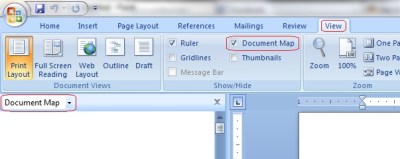


 For MAC users, it will be found on the sidebar. Icons are used instead of text.


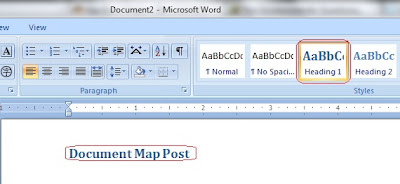
To create your first heading (Title), go back to the HOME tab and select STYLE.  Type your TITLE/HEADING and click Heading 1. You may want to change the default font.

The easiest way to edit color or font in Styles is by modifying them at the same time. On MAC, look for the Icon in the STYLE box. In the Modify box, select the heading you want to modify, select all and click New Style. A box will come up where you can adjust font, text and format.
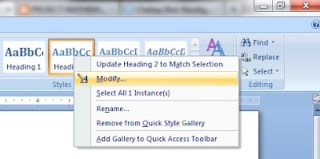
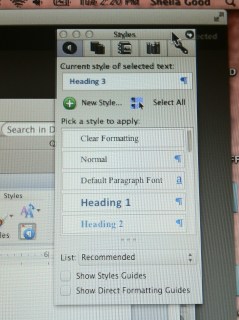
You’ll need at least one subheading to create a directory.  Once you have created your document it is easy to navigate. Want to find something in a particular chapter or section, simply click on that chapter or section in your map and you will go right to 

Here, is Matt’s sample Document Map outline:


Here, my simple Document Map (MAC) 


If you want more information check out Project Mayhem or Iain Broome’s tutorials.